
UploadWords.com AI: What Is It, How Does It Work, and Is It Worth Using?
Writing content is easier when you have the right tools, but reviewing long documents and finding repeated words can still take valuable time. Writers, students, and digital marketers need simple ways to understand their text without complicated software. uploadwords .com ai is a search term associated with a free online text-analysis platform that helps users examine word counts, character counts, and frequently used keywords. Understanding its actual features can help you decide whether it belongs in your writing workflow.
What Is UploadWords.com AI?
uploadwords .com ai refers to searches about UploadWords.com and its connection with modern writing and content-analysis tools. However, an important distinction is that UploadWords.com is primarily a text-analysis utility, not a conventional generative AI writing platform.
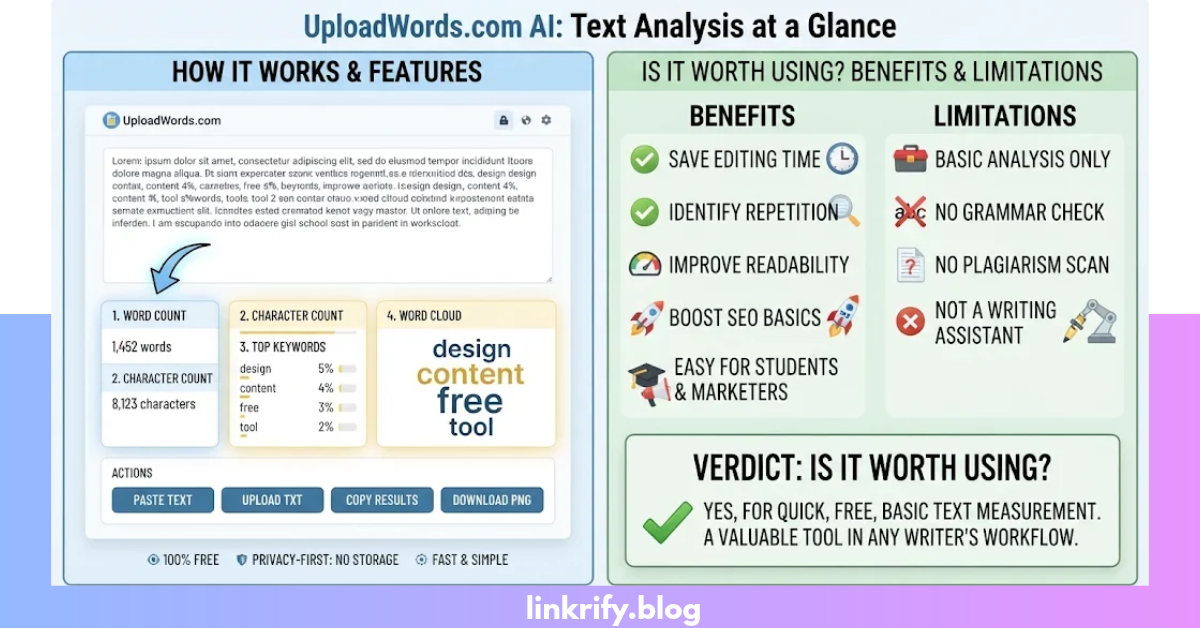
According to its official website, the platform helps users examine existing text and receive useful information about its structure and word usage. Its main features include:
- Word count: Measures the total number of words in submitted text.
- Character count: Shows how many characters a document contains.
- Keyword frequency: Identifies frequently repeated words.
- Word cloud: Presents commonly used words in a visual format.
- Copy and export: Helps users save or share analysis results.
The platform promotes free access without requiring users to create an account. This makes it useful for people who want quick writing insights without subscribing to a large software package.
How Does UploadWords.com Work?
The platform follows a straightforward process. Users provide their text, allow the tool to analyze it, and review the information displayed in the results.
The general workflow includes three steps:
- Add your text: Paste written content into the available text area or use a supported upload option.
- Analyze the content: Let the tool calculate word counts, character counts, and frequently used terms.
- Review your results: Examine the keyword list and word cloud, then copy or export useful information.
This process can help writers identify repeated expressions and understand the general structure of their documents.
For example, someone preparing a 1,500-word blog post can use the results to check the document’s length and identify words that appear too frequently.
What Are the Main Features of UploadWords.com AI?
The platform focuses on practical text-analysis features rather than offering a large collection of complicated writing functions.
1. Word Count Tool
Word counting is useful when a document needs to follow a specific length requirement.
Students may need to prepare essays within a particular word limit, while bloggers often work with editorial guidelines. The word-count feature provides a quick way to check whether a document meets those requirements.
It can help users:
- Check essay and assignment length.
- Measure blog post word counts.
- Review business documents.
- Prepare reports with specific length requirements.
- Reduce unnecessary content during editing.
2. Character Count Tool
Character counting provides another useful measurement for written content.
Some online platforms limit the number of characters users can enter into descriptions, titles, messages, or application fields. A character counter helps writers check these limits before submitting their content.
This feature can be particularly helpful for digital marketers preparing short promotional messages and website descriptions.
3. Keyword Frequency Analysis
Keyword frequency analysis shows which words appear most often in a document.
For bloggers and SEO professionals, this information can help identify repeated terminology and improve content variety.
For example, consider an article about digital marketing. If the word “marketing” appears repeatedly in almost every paragraph, the writer may need to improve sentence variety or explain related concepts more clearly.
However, keyword frequency should not be confused with Google keyword research. It measures words inside the submitted document rather than their monthly search volume or ranking difficulty.
4. Word Cloud Generator
A word cloud converts frequently used terms into a visual presentation.
Words appearing more often generally receive greater visual prominence. This makes it easier to identify recurring topics without reading every word in a long document.
Common applications include:
- Educational presentations.
- Research summaries.
- Blog planning.
- Meeting notes.
- Survey analysis.
- Vocabulary exercises.
Users can also download a word cloud as a PNG image, according to the platform’s About page.
5. Copy and Export Options
Copying and exporting results can make the editing process more convenient.
Instead of manually recording every result, users can copy useful information and include it in their reports or writing notes.
These options can help students, editors, and marketers organize their text-analysis findings.
Is UploadWords.com AI a Free Tool?
Yes. UploadWords.com describes its service as free and advertises access without registration.
This means users can explore its advertised text-analysis features without first purchasing a subscription.
Its no-signup approach can be useful for:
- Students checking assignments.
- Bloggers reviewing articles.
- Freelance writers editing drafts.
- Marketers examining website content.
- Professionals preparing written reports.
However, free access does not automatically mean that every possible writing feature is included. Users should check the official website for the latest available functions.
Who Should Use UploadWords.com?
uploadwords .com ai may attract people looking for simple ways to review their writing. Its practical features can support several different types of users.
Students and Teachers
Students can check assignment lengths and identify repeated vocabulary before submitting their work.
Teachers can also use word clouds to introduce vocabulary activities, examine classroom writing exercises, and create visual learning materials.
Bloggers and Content Writers
Bloggers regularly review articles before publishing them.
A word-frequency report can help identify repetitive language and show which terms dominate a particular article. Writers can then revise unnecessary repetition and improve the reading experience.
SEO Professionals
SEO professionals can use keyword frequency as one small part of their content-review process.
For example, an editor can check whether a target phrase appears excessively throughout a draft. However, the tool does not replace dedicated SEO research, competitor analysis, or search-intent evaluation.
Digital Marketers
Marketing professionals create website descriptions, advertisements, landing pages, and promotional content.
Character counting and word analysis can help them prepare concise messages and review their written material.
Researchers and Analysts
Researchers can use word clouds to explore recurring terms in non-sensitive research notes and written responses.
However, serious research requires additional methods because word frequency alone cannot explain meaning, context, or relationships between ideas.
How to Use UploadWords.com Step by Step
Getting started does not require advanced technical knowledge. The platform is designed around a simple text-analysis process.
Follow these steps to examine your writing:
- Visit the official website: Open UploadWords.com.
- Open the text-analysis tool: Find the Upload Words tool on the website.
- Enter your content: Paste the text you want to examine or select a supported file option.
- Start the analysis: Allow the website to process your submitted content.
- Check the word count: Review the total words and characters.
- Examine frequently used words: Look for repeated terms that may affect readability.
- Review the word cloud: Understand which words appear most frequently.
- Save your results: Use the available copy or export options.
For the best results, review the complete document after analyzing it. Automated statistics can identify patterns, but human editing is still necessary to improve clarity and meaning.
How Can UploadWords.com Help With SEO Content?
SEO content requires more than inserting keywords into paragraphs. A successful article should answer the reader’s questions, provide accurate information, and maintain a natural writing style.
uploadwords .com ai can support a small part of this process by showing how frequently particular terms appear in an article.
Here are several practical ways to use text analysis during SEO editing.
Identify Repeated Keywords
Excessive repetition can make an article difficult to read. A frequency report helps writers notice when a particular word appears too often.
Instead of repeating the same phrase, writers can introduce relevant terminology and explain related concepts.
Improve Content Readability
Repeated expressions can make paragraphs sound unnatural. Reviewing frequently used words gives editors an opportunity to improve sentence structure and vocabulary.
Check Article Length
Word counts help writers understand whether an article meets an editorial requirement.
However, longer articles do not automatically achieve better rankings. Content should be as detailed as necessary to satisfy the reader’s search intent.
Review Topic Consistency
A keyword list can provide a basic indication of the subjects discussed throughout an article.
Writers can use this information alongside manual editing to check whether their content remains focused on its main topic.
Avoid Keyword Stuffing
Google recommends creating helpful content for people rather than manipulating search rankings through excessive keyword repetition.
A frequency checker can help identify suspicious patterns, but it cannot independently determine whether a page follows Google’s spam policies.
For better results, combine text analysis with original research, reliable references, useful examples, and accurate answers.
UploadWords.com AI vs Traditional AI Writing Tools
It is important to understand the difference between a text analyzer and an AI writing assistant.
A text analyzer examines content that already exists. A generative AI writing assistant can create or transform content using instructions.
Both can support a writing workflow, but they perform different tasks.
| Feature | UploadWords.com | AI Writing Assistant |
| Word counting | Yes | Depends on the tool |
| Character counting | Yes | Depends on the tool |
| Keyword frequency | Yes | Depends on the tool |
| Word cloud | Yes | Not a standard feature |
| Article generation | Not advertised | Usually available |
| Paragraph rewriting | Not advertised | Often available |
| Grammar correction | Not advertised | Depends on the tool |
| Content analysis | Basic text analysis | Varies by platform |
| No-signup access | Advertised | Depends on the provider |
| Primary purpose | Analyze existing text | Generate or improve content |
The main difference is their purpose. UploadWords focuses on measuring and visualizing text, while AI writing assistants focus on generating or modifying written material.
UploadWords.com AI vs Other Writing Tools
Different writing tools solve different problems. Comparing their purposes can help users choose the right option for a particular task.
| Tool | Main Purpose | Best For | Important Limitation |
| UploadWords.com | Text analysis | Word counts and word clouds | Limited writing functions |
| Google Docs | Document creation | Writing and collaboration | Not a dedicated word-cloud tool |
| Microsoft Word | Document editing | Professional documents | Advanced features may require a license |
| WordCounter | Text counting | Word and character checks | Different feature set |
| ChatGPT | AI assistance | Drafting and editing | Requires human fact-checking |
These tools are not direct replacements for one another. Users can combine them to create a more effective writing process.
For example, a blogger could prepare an article in Google Docs, use an AI assistant for editing suggestions, and then use UploadWords to examine word frequency.
Benefits of Using UploadWords.com
The platform offers several practical advantages for people who regularly work with written content.
Simple User Experience
A straightforward interface makes basic text analysis easier for beginners. Users do not need advanced writing or technical skills to understand word counts and frequency results.
No Mandatory Registration
The website advertises access without account creation. This reduces the time required to get started.
Quick Text Analysis
The tool focuses on presenting basic writing statistics without requiring users to review every word manually.
Helpful Visual Presentation
Word clouds offer a visual way to explore frequently used terms. They can make simple writing patterns easier to recognize.
Useful for Different Writing Tasks
Students, bloggers, researchers, teachers, and marketers can all benefit from basic text-analysis functions.
Convenient Online Access
Users can access the website through a browser instead of installing a dedicated desktop application.
Limitations of UploadWords.com You Should Know
Although the platform provides useful functions, it is important to understand what it does not offer.
It Is Not a Complete AI Writer
The official website presents UploadWords as a text-analysis toolkit. It does not advertise full article generation or conversational AI writing features.
It Does Not Replace Grammar Checkers
Word counts and keyword frequency cannot identify every spelling, punctuation, or grammatical problem.
Writers should use a dedicated proofreading tool or carefully review their work.
It Does Not Provide Google Search Data
The top keywords feature measures word frequency within submitted text. It does not provide Google search volume, keyword difficulty, or live ranking information.
It Cannot Judge Content Quality
A word cloud cannot determine whether an article contains accurate information, useful explanations, or reliable sources.
Human judgment remains important.
File Support Should Be Checked
Users should verify the current upload options before preparing documents. The official homepage FAQ and other website descriptions have not always presented file-upload availability consistently.
It Is Not a Complete SEO Platform
Professional SEO work involves technical audits, backlink analysis, competitor research, search-intent analysis, and performance tracking.
UploadWords should be treated as a supporting utility rather than a complete SEO solution.
Is UploadWords.com Safe and Private to Use?
Privacy is an important consideration whenever users submit written content to an online platform.
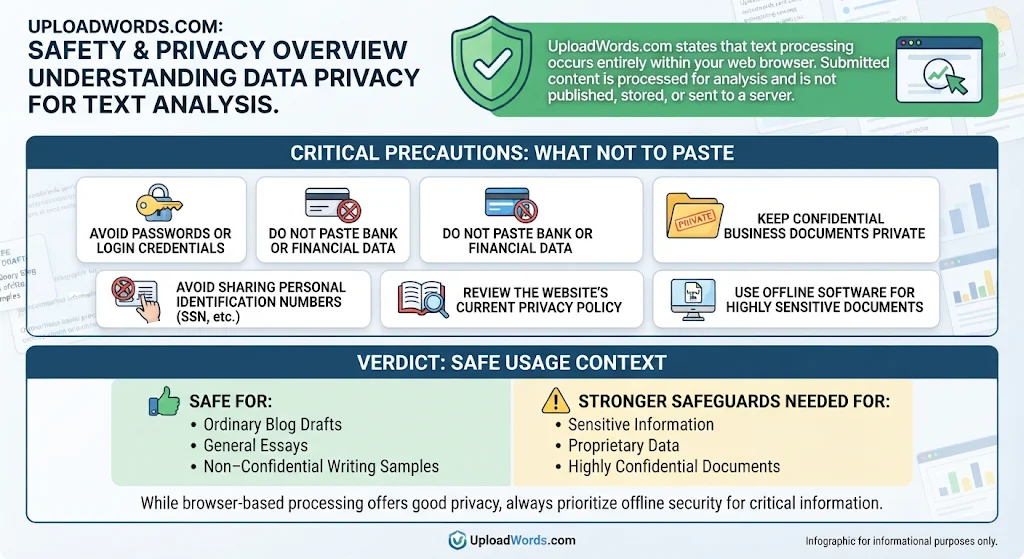
UploadWords describes itself as privacy-focused and states that submitted text is processed for analysis rather than published publicly. Its About page also says that text processing takes place in the browser.
However, users should understand the difference between a privacy claim and a complete security guarantee.
Before using the platform, consider these precautions:
- Avoid submitting passwords or login credentials.
- Do not paste bank details or financial information.
- Keep confidential business documents private.
- Avoid sharing personal identification numbers.
- Review the website’s current privacy policy.
- Use offline software for highly sensitive documents.
For ordinary blog drafts, general essays, and non-confidential writing samples, a basic text analyzer may be convenient. However, sensitive information deserves stronger privacy safeguards.
Best Practices for Getting Better Results From UploadWords.com AI
Using a text-analysis tool effectively requires more than simply pasting content and checking the numbers.
A thoughtful approach can make the results more useful.
Start With a Complete Draft
Analyze a complete article or document whenever possible. This gives you a broader view of word usage and repeated terminology.
Remove Unnecessary Repetition
Review frequently used words and identify expressions that do not add meaning.
Do not replace every repeated word automatically. Important technical terms and names sometimes need to appear several times.
Keep Your Main Topic Clear
Check whether your article consistently discusses its intended subject.
Add useful explanations where necessary instead of inserting unrelated keywords.
Use Word Clouds for Visual Insights
Word clouds can help identify recurring subjects, but always read the surrounding sentences before making editorial decisions.
Combine Automated and Manual Editing
Use automated statistics to identify possible problems, then revise the content yourself.
This approach helps preserve natural language and the original meaning of your writing.
A Practical Content Workflow Using UploadWords.com
Writers can incorporate the platform into a simple editing routine without changing their entire publishing process.
| Stage | Activity | Purpose |
| 1 | Research the topic | Understand the audience and search intent |
| 2 | Prepare the outline | Organize the article |
| 3 | Write the first draft | Develop original content |
| 4 | Edit the article | Improve clarity and accuracy |
| 5 | Use UploadWords | Check word count and repeated terms |
| 6 | Review keyword frequency | Identify unnecessary repetition |
| 7 | Proofread manually | Correct grammar and improve flow |
| 8 | Verify sources | Confirm factual accuracy |
| 9 | Complete SEO checks | Review titles, headings, links, and metadata |
| 10 | Publish | Deliver the finished article to readers |
This workflow keeps the tool in its proper role. It supports the editing process without replacing research, writing skills, or editorial judgment.
Does UploadWords.com Have a Future in Online Writing?
The demand for simple online productivity tools continues as more people create digital content for education, business, and publishing.
Writers increasingly need convenient ways to review long documents, examine repeated language, and organize information.
Tools that provide quick text measurements can remain useful because they solve specific problems without requiring complicated software.
However, the future success of any platform depends on its development, reliability, user experience, privacy practices, and ability to meet changing user expectations.
For now, UploadWords has a clearly defined purpose: providing basic text-analysis functions through a simple online interface.
Its value comes from making a small but useful part of the writing process easier.
Frequently Asked Questions
What is UploadWords.com AI?
UploadWords.com is a free online text-analysis platform that provides word counts, character counts, keyword frequency reports, and word cloud generation.
Is UploadWords.com free to use?
Yes. The official website advertises free access without requiring users to register or purchase a subscription.
Does UploadWords.com generate AI-written articles?
No. Its advertised purpose is text analysis rather than generating complete articles. Users can examine existing content and identify frequently used words.
Can UploadWords.com help with SEO?
Yes, as a supporting tool. It can help writers examine keyword frequency and identify repeated terms, but it does not replace professional SEO research or keyword-ranking tools.
Is UploadWords.com safe for private documents?
The platform describes its text processing as privacy-focused. However, users should avoid submitting passwords, financial information, confidential documents, or other sensitive material.
Who can benefit from UploadWords.com?
Students, bloggers, content writers, teachers, researchers, and digital marketers can use its basic text-analysis features to review written material and understand word patterns.
Conclusion
uploadwords .com ai is a useful search term for people exploring simple online text-analysis solutions. UploadWords.com focuses on practical features such as word counting, character measurement, keyword frequency, and visual word clouds. Its free access and straightforward approach make it worth exploring for everyday writing tasks.
However, it should be viewed as a supporting writing utility rather than a complete AI writing or SEO platform. Combining its analysis features with careful proofreading, original research, and reliable SEO practices can help users produce clearer and more useful content.
If you regularly prepare essays, blog posts, or business documents, visit the official website and explore whether its features meet your writing needs.