

UploadWords.com Free Top Keywords: How Does It Work? Review
Writers often finish an article without knowing which words appear too frequently or whether the content stays focused on its main topic. This can make editing difficult and reduce clarity. uploadwords.com free top keywords offers a simple way to examine written content through keyword frequency, word counts, character counts, and a visual word cloud. It helps students, bloggers, and marketers understand their writing without paying for a complicated software subscription.
What Is UploadWords.com?
UploadWords.com is a free online text analysis tool that identifies frequently used words in text. It also provides word counts, character counts, and a word cloud to help users understand their content.
UploadWords.com
| Feature | Details |
| Main purpose | Text analysis |
| Pricing | Free, according to its website |
| Account | No signup advertised |
| Word counter | Yes |
| Character counter | Yes |
| Top keywords | Yes |
| Word cloud | Yes |
| Stopword filter | Yes |
| Minimum word length | Yes |
| Export | Copy results and PNG download |
| Best suited for | Students, writers, bloggers, marketers |
Features are based on the tool’s published information, not an independent performance audit.
What Is UploadWords.com Free Top Keywords?
The tool helps users understand the words and terms that appear most often in a piece of writing. Instead of checking every sentence manually, users can analyze their text and view a frequency-based keyword list.
For example, if you write an article about digital marketing, words such as marketing, content, website, and search may appear frequently. The results help you see whether your draft reflects its intended subject.
The main purpose of uploadwords.com free top keywords is to make text analysis easier. It is particularly useful when you want to review an article before publishing it.
How Does UploadWords.com Work?
The process is straightforward and does not require advanced technical knowledge. You provide your text, run the analysis, and review the results.
Follow these steps:
- Open the website: Visit the official UploadWords tool page.
- Add your content: Paste your article or use the available file-upload option.
- Choose your settings: Enable stopword removal and adjust minimum word length if needed.
- Analyze the text: Start the analysis to generate the results.
- Review keywords: Check the words that appear most frequently.
- Explore the word cloud: Look at the visual representation of your text.
- Save your results: Use the available copy or PNG download options.
The tool page currently describes TXT uploads with a 4 MB limit. However, some other official website information has described uploads as coming soon. If uploading is unavailable, pasting your text is a practical alternative.
What Are the Main Features of UploadWords?
UploadWords combines several basic writing analysis functions in one place. These features can help users review content without switching between multiple simple utilities.
Word Count
The word counter displays the number of words in your submitted content. It helps students meet assignment limits and bloggers prepare articles with suitable lengths.
Character Count
Character counting shows how many characters your text contains. This can help when preparing short descriptions, social media posts, and other content with character limits.
Top Keyword Frequency
The keyword frequency feature identifies the words that appear most often in your writing. It helps you notice repeated terms and understand which subjects dominate your content.
Word Cloud Generator
The word cloud turns frequently used words into a visual display. More frequently used terms appear more prominently, making it easier to identify the main themes of a document.
Stopword Removal
Stopwords are common words such as “the,” “and,” “is,” and “to.” Removing them can make your keyword list more meaningful by reducing the number of ordinary connecting words.
Minimum Word Length
This setting filters out words below a selected length. It can help users focus on more descriptive terms instead of very short words.
Copy and Download Options
The website advertises options for copying analysis results and downloading a word cloud as a PNG image. These options can help users save or share their findings.
Is UploadWords.com Free to Use?
Yes. UploadWords describes its main text analysis tool as completely free, without subscriptions or mandatory registration.
Users can access its advertised word counting, character counting, keyword frequency, and word cloud features without purchasing a paid plan.
This makes it a convenient starting point for people who only need basic text analysis. However, users should distinguish between free keyword frequency analysis and advanced SEO research, which requires additional data.
Who Should Use UploadWords.com?
The tool can support different types of writing and editing tasks.
- Students: Check essay length, assignment requirements, and repeated words.
- Bloggers: Review articles before publishing and identify excessive repetition.
- SEO writers: Examine keyword frequency in existing content.
- Digital marketers: Review website copy and marketing material.
- Content editors: Identify repeated terms and improve readability.
- Researchers: Examine frequently appearing words in reports and text samples.
It is most useful for people who need quick information about existing text rather than advanced keyword discovery.
How Can UploadWords Help With SEO Content?
SEO writing requires more than adding a keyword several times. A useful article should answer the reader’s question, explain the subject clearly, and include relevant information.
UploadWords can support this process by showing which terms dominate your draft.
For example, after writing a blog post, you can:
- Check whether the main topic appears naturally.
- Identify words repeated unnecessarily.
- Find supporting terms already present in the article.
- Remove distracting repetition.
- Improve sentences that do not communicate useful information.
However, uploadwords.com free top keywords does not provide Google search volume, keyword difficulty, ranking positions, or competitor research. It should support your SEO workflow rather than replace a dedicated keyword research platform.
UploadWords vs Traditional Keyword Research Tools
Understanding the difference between text analysis and keyword research helps you choose the right tool for each task.
| Comparison | UploadWords | Traditional SEO Keyword Tool |
| Main purpose | Analyze existing text | Research search terms |
| Word frequency | Yes | Depends on tool |
| Word count | Yes | Usually not the main feature |
| Character count | Yes | Usually not the main feature |
| Word cloud | Yes | Not always |
| Google search volume | No advertised feature | Often available |
| Keyword difficulty | No advertised feature | Often available |
| Search trends | No advertised feature | Available in some tools |
| Competitor analysis | No advertised feature | Available in some tools |
| Best use | Content review | Keyword planning |
The two approaches serve different purposes. You can use an SEO research tool before writing and UploadWords afterward to examine your finished draft.
Does UploadWords Find Google Search Volume?
No. This is an important distinction.
The top keywords feature identifies words according to how frequently they appear in the text you provide. It does not reveal how many people search for those terms on Google.
For example, imagine you enter an article containing the word “website” 35 times. UploadWords may show that frequency in its results.
That does not mean 35 people searched for the word website. It only means the word appeared 35 times in your submitted content.
For actual keyword research, use tools such as Google Keyword Planner and other dedicated SEO platforms.
How to Use Top Keywords for Better Content Editing
Keyword frequency becomes useful when you understand what the numbers mean. A high count does not automatically indicate good or bad writing.
Use these practical editing techniques:
- Check topic relevance: Make sure the most frequent meaningful words relate to your article.
- Remove unnecessary repetition: Rewrite sentences that repeat the same expression without adding information.
- Improve word variety: Use accurate related terms where they make the sentence clearer.
- Review supporting topics: Identify important concepts that deserve additional explanation.
- Read the article again: Make sure the writing sounds natural after editing.
Remember that readability and usefulness matter more than reaching an arbitrary keyword count.
What Are Stopwords and Why Do They Matter?
Stopwords are frequently used words that provide grammatical structure but often offer little information about a document’s subject.
Examples include:
| Common Stopword | Why It May Be Filtered |
| The | Frequently used article |
| And | Connects words or ideas |
| Is | Common helping verb |
| Of | Shows relationships |
| To | Common grammatical word |
| In | Indicates location or context |
| For | Shows purpose or relationship |
| With | Connects related ideas |
When you enable stopword removal, the results can focus more clearly on meaningful words.
For most English-language article reviews, enabling this option is a useful starting point. However, always review the original sentences because common words can still carry meaning in certain contexts.
UploadWords.com Advantages and Limitations
Every online utility has strengths and limitations. Understanding both helps you decide whether it matches your requirements.
Advantages
- Free access to the advertised core features.
- No account registration advertised.
- Simple interface for basic text analysis.
- Word and character counting in one place.
- Keyword frequency results.
- Visual word cloud generation.
- Stopword and minimum-length filters.
- Copy and PNG export options.
Limitations
- It does not advertise Google search volume data.
- It does not provide keyword difficulty scores.
- It is not a complete SEO research platform.
- It does not replace grammar or plagiarism checkers.
- The advertised file-upload availability is inconsistent across its official pages.
- Its frequency results depend on the text you submit.
These limitations do not make the tool useless. They simply define what it can and cannot do.
Is UploadWords.com Safe and Private?
Privacy is an important consideration when using any online text analysis service.
UploadWords describes itself as privacy-focused and states that submitted text is processed for analysis rather than saved or shared. Its About page also says processing takes place in the browser.
These are statements published by the website operator, not an independent security certification.
For safer use, follow these precautions:
- Avoid entering passwords or financial information.
- Do not paste private identity documents.
- Keep confidential business documents out of online tools unless you have verified their security requirements.
- Review the website’s privacy policy before submitting sensitive information.
- Use ordinary sample text when testing an unfamiliar feature.
A privacy statement is useful, but it should not be treated as proof that every possible security risk has been eliminated.
Best Practices for Getting Accurate Keyword Results
The quality of your results depends partly on the text you submit and the settings you select.
Here are some useful practices:
- Use complete content: Analyze the entire article instead of a random paragraph when reviewing overall topic consistency.
- Remove stopwords: Filter common words to make the frequency list easier to understand.
- Set a suitable minimum length: Start with three or four characters for general English content.
- Review the highest-frequency terms: Check whether they represent the subject of your article.
- Look for unnecessary repetition: Improve sentences that repeat information.
- Check phrases separately: A single-word frequency list may not reveal how often a complete multiword phrase appears.
- Use additional SEO tools: Research search demand separately when planning new content.
These steps can help you turn a simple keyword list into practical editing improvements.
How to Calculate Keyword Density Using UploadWords
Keyword density describes how often a particular keyword appears in relation to the total number of words in a document.
You can calculate it using this formula:
KeywordDensity=KeywordOccurrencesTotalWords100
For example, suppose your article contains 1,500 words and your target keyword appears 15 times.
\[ \frac{15}{1500}\times100=1\% \]
Example keyword density calculator
Total article words
[Input placeholder: Enter total words] (Current value unavailable.)
Keyword occurrences
[Input placeholder: Enter keyword count] (Current value unavailable.)
This calculation is useful for reviewing keyword usage, but Google does not prescribe a universal ideal keyword density. Write naturally and avoid forcing keywords into sentences.
UploadWords.com vs Other Free Writing Tools
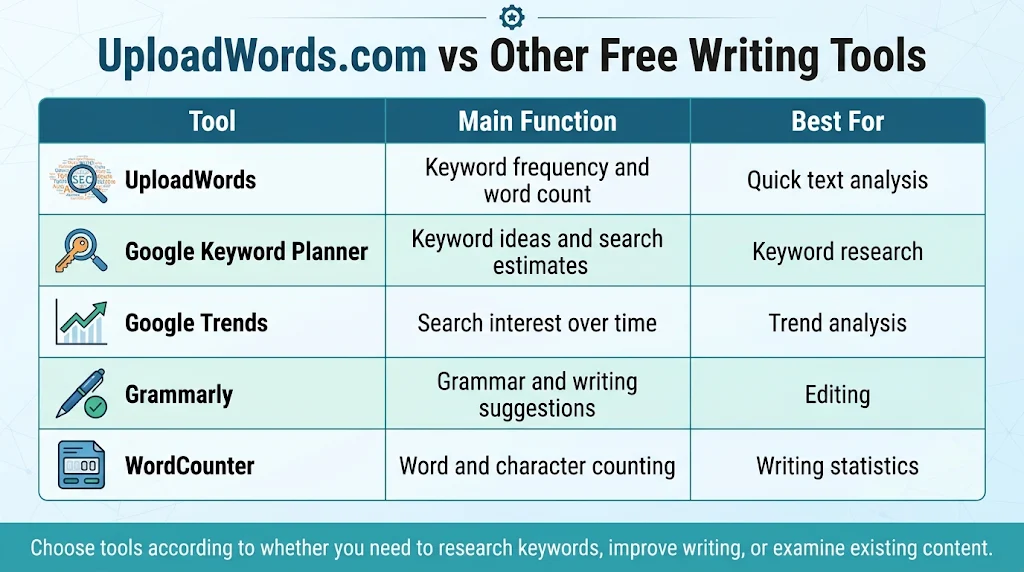
Different writing tools solve different problems. UploadWords focuses on word frequency and text statistics, while other platforms offer additional editing and SEO functions.
| Tool | Main Function | Best For |
| UploadWords | Keyword frequency and word count | Quick text analysis |
| Google Keyword Planner | Keyword ideas and search estimates | Keyword research |
| Google Trends | Search interest over time | Trend analysis |
| Grammarly | Grammar and writing suggestions | Editing |
| WordCounter | Word and character counting | Writing statistics |
These tools can complement each other. Choose them according to whether you need to research keywords, improve writing, or examine existing content.
Should You Use UploadWords.com for Your Next Article?
UploadWords is worth considering if you regularly create essays, blog posts, website pages, or marketing content. Its simple interface and advertised free features make basic text analysis accessible to beginners.
However, it should not be your only SEO resource. Combine keyword frequency analysis with search intent research, accurate information, useful examples, and careful editing.
If your main objective is to improve an article before publication, uploadwords.com free top keywords can be a helpful part of your writing process.
Frequently Asked Questions
1. What is uploadwords.com free top keywords?
It is a keyword frequency feature that identifies the most frequently used words in submitted text. It also helps users review word counts and visualize repeated terms through a word cloud.
2. Is UploadWords.com completely free?
Yes. The official website advertises free access without mandatory registration, subscriptions, or hidden charges for its main tool.
3. Does UploadWords provide Google keyword search volume?
No. It analyzes the frequency of words in your submitted content. It does not provide Google search volume, keyword competition, or ranking data.
4. Can I upload a document to UploadWords?
The tool page lists TXT file support with a maximum size of 4 MB. However, the website’s other pages have displayed different upload availability information, so check the current tool interface before uploading.
5. Does UploadWords.com help improve SEO?
Yes, indirectly. It can help identify repeated words, review keyword frequency, and improve content clarity. However, it cannot replace dedicated keyword research or technical SEO tools.
6. Is UploadWords safe for private documents?
The website states that it processes text for analysis and does not save or share submitted content. However, users should avoid entering passwords, financial details, or highly confidential information into online tools.
Conclusion
UploadWords offers a straightforward way to analyze written content without paying for a complicated writing platform. Its word counter, character counter, keyword frequency list, and word cloud can help students, bloggers, and marketers understand their drafts and identify unnecessary repetition.
Although it does not replace professional SEO research platforms, it can make everyday content editing easier. Use it alongside proper keyword research and people-first writing practices to create clearer, more useful articles.
Ready to analyze your next article? Visit UploadWords.com, enter your content, and explore its keyword frequency results before publishing.


